New computer purchase help

I've gone to the HP site and built my laptops from their site for years now and have yet to be disappointed with their product quality. My last HP was about 8 years old and started dying a slow death so I gave it to my computer guy who wiped it clean and installed a new drive for $130 dollars and that became my shop computer.

My wife insisted on a Dell recently and she has not been happy with it. Personally I think it's cheaply made.

 
NEVER use your work computer for personal stuff.

The work computer does not belong to you, and you never know what "software" may be on it from your company.

that's not the issue, I own the firm and as such the computer system. There are segregated areas accessible by only me, but nonetheless the balance is shared and mistakes happen so it just makes sense to continue to keep it all separate from home.

I've gone to the HP site and built my laptops from their site for years now and have yet to be disappointed with their product quality. My last HP was about 8 years old and started dying a slow death so I gave it to my computer guy who wiped it clean and installed a new drive for $130 dollars and that became my shop computer.

My wife insisted on a Dell recently and she has not been happy with it. Personally I think it's cheaply made.

Prior to opening my current practice (2019) I was a solo practitioner & always bought computers direct from Dell, never had an 'IT guy', never needed one. Those computers always treated me well for the most part, though I did have issues with one of them.

Since starting the new office it's gotten much more complicated so I turned it over to a company, it aint cheap of course but man it's nice to not give one fuck about the system when something glitches or breaks, that's their headache to resolve for me...

It's funny, to this day they talk to me explaining what the problem is & how they're going to resolve it as if I give a crap and I've told them over and over something to the effect of 'you may as well be explaining this to me in German because that's how much I'm understanding... I really don't care what the problem is, just make it all gone'.
 
i3 processor and Windows 11 home....

RUN! Do not walk... AWAY!

He hasn't specified a budget. Though if you have something you suggest (that doesn't have Linux) feel free to post a link. He specified "simple home desktop for general uses". If you think he should setup a Linux PC, then you're not paying attention.
 
He hasn't specified a budget. Though if you have something you suggest (that doesn't have Linux) feel free to post a link. He specified "simple home desktop for general uses". If you think he should setup a Linux PC, then you're not paying attention.

Yea, I know he won't do Linux. But at least stay the Hell away from any "Home" version of WinBloze. The "Pro" or "Enterprise" or whatever the eff they're calling them this week will at least enable one to bypass SOME of the Microslop bullshit. And get at least an i5 processor, or the AMD equivalent.
 
  • Like
Reactions: chili_pepper
Yea, I know he won't do Linux. But at least stay the Hell away from any "Home" version of WinBloze. The "Pro" or "Enterprise" or whatever the eff they're calling them this week will at least enable one to bypass SOME of the Microslop bullshit. And get at least an i5 processor, or the AMD equivalent.

Please post a link to one that you suggest, I'm guessing it will be hundreds more. i5 is a more robust CPU that I don't think he needs. The one I posted has 16GB RAM which I believe is important.
 
But at least stay the Hell away from any "Home" version of WinBloze. The "Pro" or "Enterprise" or whatever the eff they're calling them this week will at least enable one to bypass SOME of the Microslop bullshit.

Yes. The "Home" version takes a fair bit of control away from the end user (who bought the computer and software) and gives it to Micro$oft.
 
  • Like
Reactions: Zorba
Yes. The "Home" version takes a fair bit of control away from the end user (who bought the computer and software) and gives it to Micro$oft.

All of the Windows versions are actually available as Linux distros at massgrave.dev.
 
Another neat little "trick" that Microsoft has added to current Windows is the inability to just install a local account.

Now any new Home version setup will require an internet connection and Microsoft account before you can set the computer up.

A standard new setup of Windows 11 officially requires an active internet connection and a Microsoft account

Microsoft designed the initial setup (OOBE, or Out Of Box Experience) to force you online, especially for Windows 11 Home. However, if you don't have internet or prefer a traditional local offline account, there are still workarounds.


You used to be able to go to a command prompt during setup and type OOBE\BYPASSNRO to bypass the network requirement option, but that wasn't available the last time I set one up.

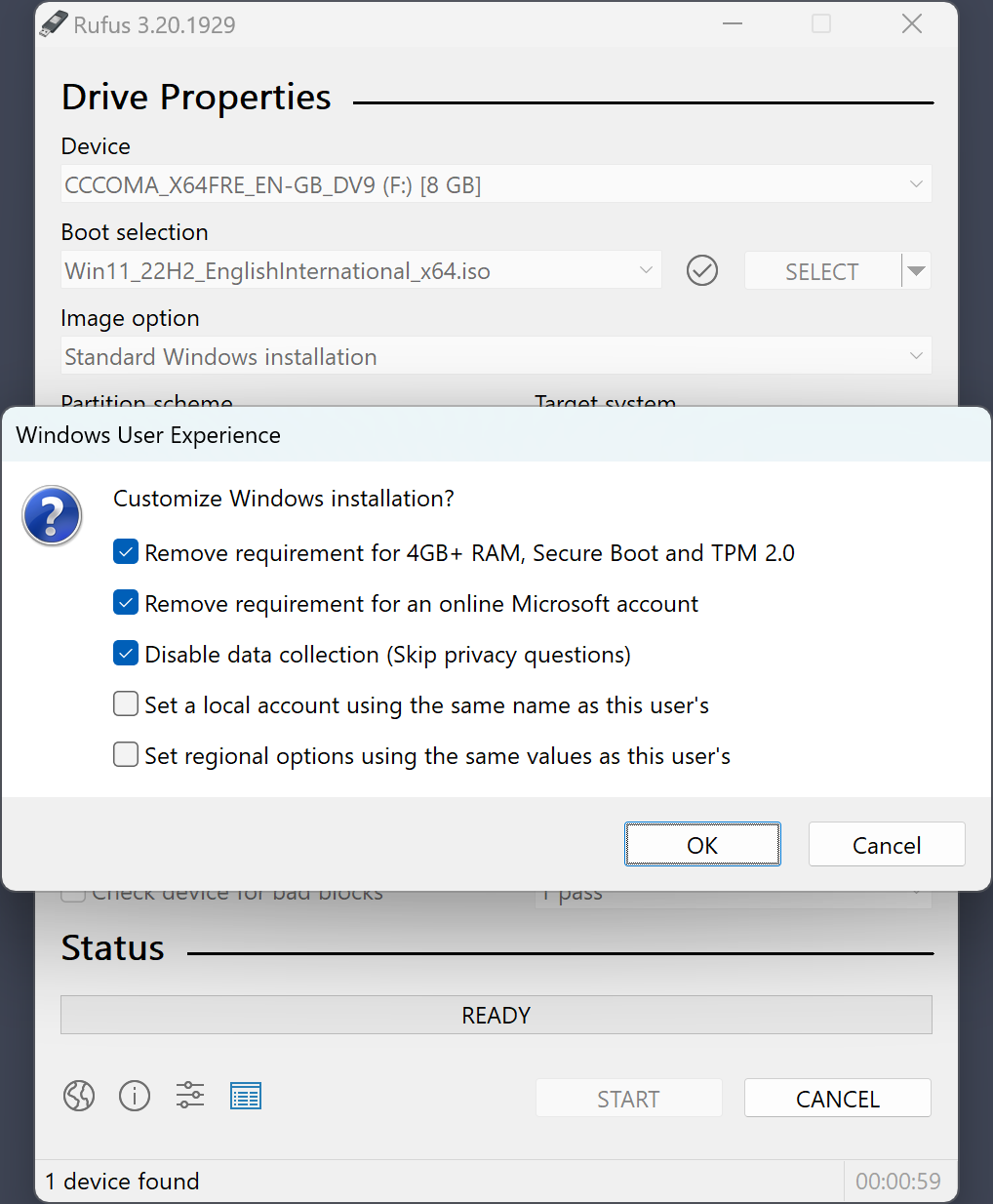
I got the official ISO from Microsoft and burned a bootable USB with Rufus to remove the network requirement and all the TPM/tracking/advertising garbage that Microsoft graciously gives you for "free".

"Free" is very different than "At No Cost". If software is provided to you At No Cost, it most likely is not Free. Think Gmail.

screenshot4_en.png


It's almost like MS is actively pushing people to an alternative.

But many just accept what they're given and MS can continue getting away with their BS.
 
Last edited:
Another neat little "trick" that Microsoft has added to current Windows is the inability to just install a local account.

Now any new Home version setup will require an internet connection and Microsoft account before you can set the computer up.

A standard new setup of Windows 11 officially requires an active internet connection and a Microsoft account

In my particular case Microsoft Office is basically the only computer program I use & has served me well for a decades now, so having the account (and an active internet connection) isn't an issue, regardless of whatever trickery that entails on the part of Microsoft.

He hasn't specified a budget. Though if you have something you suggest (that doesn't have Linux) feel free to post a link. He specified "simple home desktop for general uses". If you think he should setup a Linux PC, then you're not paying attention.

I hadn't thought about a budget, but I guess the budget is the least amount of money I have to spend to be able to type letters in Word, send/receive emails, make snide comments on the regular here in TJ Forum Land, and order protein powder on Amazon.

It's not hyperbole to say that is literally 99.99% of my uses for the home computer.

But for the typing letters part I'd say I could probably get away without a computer altogether & just use my phooooone for all purposes, but in the end the screen is too small :ROFLMAO:

Zooming out & looking at the broader context, there's a recognizable pattern in the shit I do, I wear Levis & T-shirts, drive an entry level economy car, borrow books from the library, cook all my own food, brew my own coffee, cut my own grass, and apropos to this thread, need/use probably less than 1% of a modern computer's capabilities... frugal simplicity is the prime driver of most of my decisions
 
I agree with the Linux suggestions, if nothing else to avoid Microshaft. If you think you would be able to use the web application version of Word in a browser instead of the full application it would be the most secure, best performing choice you could make. Before you completely write it off, I would suggest running a live USB Linux on your old machine as a trial run. You would feel at home with something like Linux Mint Cinnamon Edition. PM if you need assistance, but basically you download it to a USB drive and then boot up from it instead of Windows (which will remain untouched). If you like it, then you can do the full install on the hard drive.

If you insist on a new win11 machine, consider the Beelink SER8 Mini PC, AMD Ryzen 7 8745HS, 16GB DDR5 RAM 500GB PCle4.0 SSD and hook up your existing monitor, mouse and keyboard. I'm in the same boat as you with respect to computing. I don't game or do CAD, etc where I would need to spend more.
 
I ditched Microsoft decades ago when I switched to Apple. Owning Macs has been a very, very pleasant experience.

In recent years I've decided I should probably switch to a Linux system due to privacy concerns I have with big tech companies (Apple being one of them), but ultimately I stay with Apple because I use Logic Pro for recording music which I very much enjoy. In addition, I still have to give it to Apple, their OS is completely intuitive and very, very easy to use.
 
  • Like
Reactions: RangerTJ
I agree with the Linux suggestions, if nothing else to avoid Microshaft. If you think you would be able to use the web application version of Word in a browser instead of the full application it would be the most secure, best performing choice you could make. Before you completely write it off, I would suggest running a live USB Linux on your old machine as a trial run. You would feel at home with something like Linux Mint Cinnamon Edition. PM if you need assistance, but basically you download it to a USB drive and then boot up from it instead of Windows (which will remain untouched). If you like it, then you can do the full install on the hard drive.

I'm willing to give this a shot, but have no idea how to do what you suggested? I'm also not sure about using a web application version of Word, or even what that means, as compared to what I already use?
If you insist on a new win11 machine, consider the Beelink SER8 Mini PC, AMD Ryzen 7 8745HS, 16GB DDR5 RAM 500GB PCle4.0 SSD and hook up your existing monitor, mouse and keyboard. I'm in the same boat as you with respect to computing. I don't game or do CAD, etc where I would need to spend more.

I'm not insisting on anything :ROFLMAO: other than causing the least amount of strife for myself now & going forward. In other words, despite having always used Windows and Office & such, I have no allegiance to any such systems, I've simply continued to use them as they've always been the devil I (sort of) know...
 
I agree with the Linux suggestions, if nothing else to avoid Microshaft. If you think you would be able to use the web application version of Word in a browser instead of the full application it would be the most secure, best performing choice you could make. Before you completely write it off, I would suggest running a live USB Linux on your old machine as a trial run. You would feel at home with something like Linux Mint Cinnamon Edition. PM if you need assistance, but basically you download it to a USB drive and then boot up from it instead of Windows (which will remain untouched). If you like it, then you can do the full install on the hard drive.

If you insist on a new win11 machine, consider the Beelink SER8 Mini PC, AMD Ryzen 7 8745HS, 16GB DDR5 RAM 500GB PCle4.0 SSD and hook up your existing monitor, mouse and keyboard. I'm in the same boat as you with respect to computing. I don't game or do CAD, etc where I would need to spend more.

My take, per above, is Linux is not going to be a good fit for him. Maybe if he has someone in his life that he can hand the PC to and pick it up when it has LInux. If he were local, I'd do this for him (or if he wants to ship his existing PC).

I do agree that Mint (or most Ubuntu spins) would work. Just not if he has to do everything himself. So that said, unless he has an 'IT nerd' that can do it for him, he should stick to Win11.

Also those that say Win11 Home isn't good: Again, it will be fine for him. He's not going to use Rufus to build a custom flash drive to wipe his PC. Let's try to read between the lines here and help the guy out?

If the next person posts that he should definitely build a custom Arch install, I'm going to spit out my coffee for fuck sake!

I'm going to refer to the next person that suggests Linux as a Fuck Tard... ;)
 
I wasn't telling him to use Rufus, I was pointing out that MS is making it difficult to bypass the internet and MS account requirements.

But yeah, way more info than OP needs.

Just FYI info for some of the other guys in the thread.
 
I'm willing to give this a shot, but have no idea how to do what you suggested?
Instructions are here. Download the .iso image file and then follow the steps under 'Live Boot' in the instructions (you will need a >= 4GB USB drive). Then, with the USB drive inserted, you boot up from the USB drive instead of the internal hard drive for a test drive. If you know someone who has worked with Linux, they could help you if you get stuck.
I'm also not sure about using a web application version of Word, or even what that means, as compared to what I already use?
Microsoft calls their Cloud office suite Microsoft 365. Basically, you can run Word (and other office applications) in a web browser instead of the traditional application. It looks similar, but won't have all of the same features.
I'm not insisting on anything :ROFLMAO: other than causing the least amount of strife for myself now & going forward. In other words, despite having always used Windows and Office & such, I have no allegiance to any such systems, I've simply continued to use them as they've always been the devil I (sort of) know...
Poor choice of word based on my bias ;^)