

You are using an out of date browser. It may not display this or other websites correctly.
You should upgrade or use an alternative browser.
You should upgrade or use an alternative browser.

What have you 3D printed for your TJ?
- Thread starter chimmike
- Start date



Darnit, you two are going to get me to spend more money...
You should already have a space mouse. It’s very handy especially with your back ground.
I’ve had them all from the puck version (cheapest) to the one like Jeff’s. The screen can be handy for setting up different functions and if you’re spending days modeling I’d recommend it but the mid tier one is almost as useful.


You should already have a space mouse. It’s very handy especially with your back ground.
I’ve had them all from the puck version (cheapest) to the one like Jeff’s. The screen can be handy for setting up different functions and if you’re spending days modeling I’d recommend it but the mid tier one is almost as useful.
In my design career, I never used anything other than a mouse, if you can believe that. I've never been exposed to any other type of input device...
Haven't gotten too far into the mouse. It was a package deal with the Enterprise. It is a nice, 5-button + wheel programmable version, and is a bit bigger and heavier than the mouse it replaces. "It feels nice" is about all I can say about it at this point...
I thought it looked pretty normal. If you find anything interesting let me know.

In my design career, I never used anything other than a mouse, if you can believe that. I've never been exposed to any other type of input device...
Same here. Though I have been exposed to other devices, I've never found any of them to improve workflow or increase productivity for me. I've always gone back to the mouse in the end. Left hand works the keyboard, right hand on the mouse...both devices show very interesting wear patterns after a year or so.
Currently, the early Logitech MX Master 2S (non BT) is my go-to, good battery life, fast tracking, decent weight and fits my mitt. Basic button functions, don't even load Logitech's special drivers for unneeded extra features. Most mice are entirely too small for "properly sized human hands".

Last edited:

I've thought about making the leap to something like a trackball or space mouse just solely for the reduced wrist movements and improved ergonomics. Carpal tunnel is a concern I have for long term usage of a keyboard and mouse. Working in cybersecurity currently and potentially starting a mechanical design company, I'll be stuck behind a desk probably for the rest of my life.
Same here. Though I have been exposed to other devices, I've never found any of them to improve workflow or increase productivity for me. I've always gone back to the mouse in the end. Left hand works the keyboard, right hand on the mouse...both devices show very interesting wear patterns after a year or so.
Currently, the early Logitech MX Master 2S (non BT) is my go-to, good battery life, fast tracking, decent weight and fits my mitt. Basic button functions, don't even load Logitech's special drivers for unneeded extra features. Most mice are entirely too small for "properly sized human hands".
The mouse doesn't really need to change, it's in addition.
I was exposed to them when I attended a training class on Unigraphics NX, used them for the week long class and was hooked.
You use the spacemouse or spaceball as we called it with your left hand so your left hand controls the position of the model while your right hand runs the normal selections from the mouse. Use whichever hand is available when typing in dimensions. If you're really heavy into keyboard shortcuts then you add those to the extra buttons on the spacemouse so it's a one button press.
We thought they improved workflow so much after that class we ordered 100 or so for the engineering department.

I'm new to this and was using this as a learning tool. Adding oil was always messy. It is less so now.
I found a model that screws on, then added a funnel.
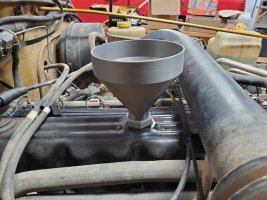
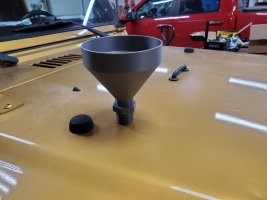
I found a model that screws on, then added a funnel.


I'm new to this and was using this as a learning tool. Adding oil was always messy. It is less so now.
I found a model that screws on, then added a funnel.
View attachment 671071View attachment 671072
I need one of those
I need one of those
As soon as I figure out how to upload it to MakerWorld, I'll post a link. My first effort to upload it failed.
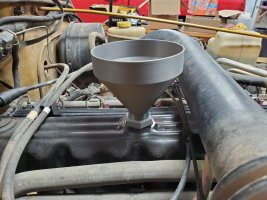
for those who may want to print their own funnel, here's the link to MakerWorld. It could be better but it is functional. I printed mine in PETG as that is oil resistant. If you make improvements, please share!
Last edited:
Tetras arrived and is set up. Looks like a great system so far.

Oh man, that's cool.
Is that like a 4-banger version of the AMS HT? Does it also do active humidity control? I think mine just monitors humidity and has a few packets of desiccant in there for good measure - but not sure.
Edit: Took a look and my questions are answered. Again - That's very cool. Let us know how it works for you, Ryan.
Oh man, that's cool.
Is that like a 4-banger version of the AMS HT? Does it also do active humidity control? I think mine just monitors humidity and has a few packets of desiccant in there for good measure - but not sure.
Edit: Took a look and my questions are answered. Again - That's very cool. Let us know how it works for you, Ryan.
My only complaint so far is I’d prefer one screen that runs all of them instead of 4 separate.
Off to basketball games, may print something tomorrow.

Here is another solution that gets decent feedback on functionality.
https://a.co/d/0iVeCwFK
https://a.co/d/0iVeCwFK

Basic compared to the others but getting back into it and reclaiming our Anycubic from the kids. Some small part bin separators


Anyone want to help me modify a stl? Going insane trying todo on my laptop trackpad.
This is a 4 way X divider for the 4in packout bins but I’d like to to just be halves. I can remove two of the legs but can’t get the center infill right so that it’s a solid piece across
This is a 4 way X divider for the 4in packout bins but I’d like to to just be halves. I can remove two of the legs but can’t get the center infill right so that it’s a solid piece across
Attachments
Anyone want to help me modify a stl? Going insane trying todo on my laptop trackpad.
This is a 4 way X divider for the 4in packout bins but I’d like to to just be halves. I can remove two of the legs but can’t get the center infill right so that it’s a solid piece across
Try this. I don't know if you were working in Fusion, but that's what I work in. I provided the Fusion file, too, so you can look at the history to see what I did. You may not have realized that you need to convert the mesh to a solid. STL files are hollow, so if you modify them, you leave holes in them. Convert to a solid, first, then modify and save as an STL.
I also work in inches, not mm. When I opened your file, the divider was 31" or so tall, so I scaled by dividing by 25.4. When you open it, you may need to scale it back up to mm using a scale factor of 25.4. If you have trouble with this file, PM your mobile number and I'll call you to walk you through it.
Attachments
Last edited:

Try this. I don't know if you were working in Fusion, but that's what I work in. I provided the Fusion file, too, so you can look at the history to see what I did. You may not have realized that you need to convert the mesh to a solid. STL files are hollow, so if you modify them, you leave holes in them. Convert to a solid, first, then modify and save as an STL.
I also work in inches, not mm. When opened your file, the divider was 31" or so tall, so I scaled by dividing by 25.4. When you open it, you may need to scale it back up to mm using a scale factor of 25.4. If you have trouble with this file, PM your mobile number and I'll call you to walk you through it.
Much appreciated, I scaled it back up and doing a test print now.
Very close.Try this. I don't know if you were working in Fusion, but that's what I work in. I provided the Fusion file, too, so you can look at the history to see what I did. You may not have realized that you need to convert the mesh to a solid. STL files are hollow, so if you modify them, you leave holes in them. Convert to a solid, first, then modify and save as an STL.
I also work in inches, not mm. When I opened your file, the divider was 31" or so tall, so I scaled by dividing by 25.4. When you open it, you may need to scale it back up to mm using a scale factor of 25.4. If you have trouble with this file, PM your mobile number and I'll call you to walk you through it.
Red version is scaled using the Anykubic slicer which is very close to fitting but the taper is misaligned.
Black is scaled using fusion but fails (twice) when printing the second end.
FWIW the unmodified version of model we’re modifying printed multiple times and fits great.
MLS SAB is scaled in fusion
Other is the slicer
This is what I’m trying to modify.
https://www.thingiverse.com/thing:6460823
Attachments