
So I went back to a wired scanner for my microcontroller project.
have we talked about this before? I can never find that thread when I want it...


So I went back to a wired scanner for my microcontroller project.

have we talked about this before? I can never find that thread when I want it...
Dunno why the AeroForce is '05/'06 only.
I also have one of these. I bought it because it’s compatible with the all of my vehicles and my moto, and the apps I use for them.This is what I use as does my buddy who likewise owns a TJ: OBDLink MX+ …

This is what I use as does my buddy who likewise owns a TJ: OBDLink MX+ Has its own customizable device display and also compatible with 3rd party software, as well as all iOS and Android devices. I goofed majorly one day by leaving it on the TJ hood during a brief test drive. Gone forever, so I immediately ordered same model replacement (which I'm much more careful where placed!).
View attachment 706526
I've used a USB OBDlink SX scanner with their OBDwiz software on a Windoze laptop for years, it's very good. It will work with other software, too.
I recently bought a cheap VEEPEAK OBDcheck VP11 Bluetooth scanner. It works, when it feels like it, but it's finicky like @NashvilleTJ 's. I was writing code to run it from a microcontroller and LCD, but I kept having to add error-checking code for the initial connection, and for dropouts, and for timeouts, and for partial responses.
I considered buying a more expensive Bluetooth scanner, like the OBDLink MX+, but decided not to gamble with Bluetooth on something which will be a permanent dash gauge. So I went back to a wired scanner for my microcontroller project.

How is the connection on thus thing, Dawg? Does it connect fast when activated and stay connected reliably?
I like that it goes to sleep and will not drain the battery. I do not leave mine installed because when it is plugged in, the lights are always on.
I also have that VEEPEAK and it's a steaming pile. It was pre-claude the last time I worked on it, but our experiences were identical. Like pretty much unusable in any capacity.
I love my OBDLink, but it uses some sort of encrypted bluetooth or some such that prevented me from using it for my own hackery. That made me sad. I'm gonna look into your hardwired approach once I'm ready to re-tackle this project. We should probably collaborate or something.

I have a VEEPEAK also and use the torque app to run it. I haven't had any issues connecting and staying connected. I mostly use it in the dashboard mode and use my phone to monitor a few things real time like coolant temp. adjusted gps speed ect... The torque app allows you to make custom dashboards with picture backgrounds and a wide variety for the number of gages with control limit alerts.I also have that VEEPEAK and it's a steaming pile.

@NashvilleTJ, With smartphone BT turned on, OBDLink MX+ typically connects on the first try with the app, although occaisionally requires a 2nd attempt. Once connected, I haven't experienced any drops whether during ignition on / engine off diagnostics for reading and clearing codes nor with engine running and viewing the app dashboard on my android phone or nav tablet
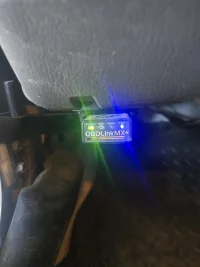
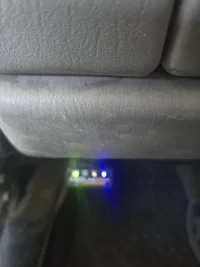
I just took some lousy pics showing sequence of OBD port device lights, i.e., 1st pic with no lights illuminated confirming truly in power-off "sleep mode", 2nd pic with the door open but no key on, showing the far LH green Power light solid and the far RH blue Link light flashing (ready to connect?) and lastly, 3rd pic shown with the app connected and ready for use. Its been plugged into the OBD port for several months with no adverse effects, as has my buddy's with his 2003 Rubi. Refer to post #3 for a clear image of device light terminology.
View attachment 706913 View attachment 706914 View attachment 706915
OK - You boys convinced me. Ordered this morning about 9:30, and it just showed up. I also downloaded the Torque App to my Android Tablet in the Rig.
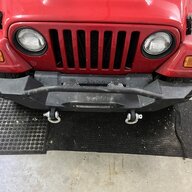
Toby approves...
View attachment 706928
...although he doesn't look as excited as I am.


Toby is giving doubting side eye vibes