Novak Conversions Jeep Wrangler TJ engine mounts

What have you 3D printed for your TJ?

Finally (maybe), I am also designing/printing a plate that will mount to the screw holes on the side of the console that held the subwoofer that I will attach my GMRS radio to.


2025-01-04_11h22_32.png
 
Ran across people talking about this organizer system on another site. May be useful to some. He even mentions that he's making stuff for his Horrible Freight tool chest.


Just recently started printing out some gridfinity for my dresser to hold all my 3d printing junk a little cleaner than a dump drawer……

Ive printed enough that I need to go order some more filament…

Id love to work up a tray idea for the back of my jeep so I can keep the basics all organized, but ill need to get an intratrunk or similar first before pursuing that project.
 
  • Like
Reactions: chili_pepper
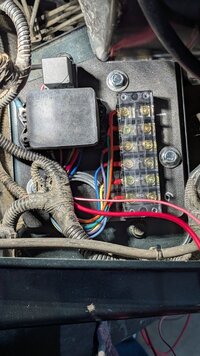
Needed to mount a fuse and distribution block for some electrical expansion and decided to print a plate that would fit on the unused spot on the drivers side against the firewall (this may be a spot used for the clutch stuff on manuals? I don't know). I used PAHT-CF so it should be plenty strong and hold up to the under hood temperatures.

1st print did not go well.....I printed it flat and it warped big time causing the print head to grab the print ad drag it off the bed.
PXL_20250108_145235380.MP.jpg

2nd time I printed it on edge and it came out really nice. Installed heat set inserts to mount the buss bar and fuse block, and factory threads in the metal plate to mount it down.
PXL_20250111_233743307.jpg
 
I had a pair of first-gen KC Cyclone lights sitting on the shelf for about a decade. I used one and a switch I had lying around to make a roll bar-mounted light. I spent a lot of time on it, but it finally gave me a reason to become more proficient with Fusion 360.

It was printed on a Bambu P1S with ABS GF filament. It has a nut buried between the print layers to hold the light in the mount, there is a groove in the underside to prevent the wires from being crushed against the roll bar, and the ridges on the base keep the clamps neatly aligned and prevent them from slipping off the end.

IMG_1037.jpeg
 
Last edited:
Not for my LJ, yet... but I printed a few things for my F150 before I lost use of my 3D printer, most notably:
  • a custom mount for my winch control box that mounts underhood, to the side of the battery box
  • bumper fillers to cover the access holes for the in-bumper winch (the one one the right has been cracked for 3+ years but stays in)
  • hubcaps & fillers for my winter steelies... with Plasti-dip and a little plastic, they almost look custom. But more importantly, they keep the salt out of the wheels.
IMG_1830.JPG


IMG_1831.JPG


All this stuff is PETG and has been used on my truck for more than 5 years (alright... the wheels, only Dec - Apr).

I really need to get another printer. I have all sorts of ideas for the LJ.
 
Last edited:
Needed to mount a fuse and distribution block for some electrical expansion and decided to print a plate that would fit on the unused spot on the drivers side against the firewall (this may be a spot used for the clutch stuff on manuals? I don't know). I used PAHT-CF so it should be plenty strong and hold up to the under hood temperatures.

1st print did not go well.....I printed it flat and it warped big time causing the print head to grab the print ad drag it off the bed.
View attachment 585320

2nd time I printed it on edge and it came out really nice. Installed heat set inserts to mount the buss bar and fuse block, and factory threads in the metal plate to mount it down.
View attachment 585321

Yikes, that is a wonky print failure to see.....

How's the nozzle? I had one fail like that a few nights ago and it bent the hell out of my nozzle. I have an order of 5 replacements coming in soon just incase it happens again...
 
The nozzle seems fine., I have done several other prints with it, but I do keep a couple spare on hand.

The real bummer was the cost of the filament and I only had one spool of it. I was printing real slow with the PAHT-CF to try to avoid warping and after about 10 hours of printing that looked great I went to bed. Woke up to that mess. The adhesion was awesome, but it warped so bad it pulled the print plate off the magnetic bed.
 
The nozzle seems fine., I have done several other prints with it, but I do keep a couple spare on hand.

The real bummer was the cost of the filament and I only had one spool of it. I was printing real slow with the PAHT-CF to try to avoid warping and after about 10 hours of printing that looked great I went to bed. Woke up to that mess. The adhesion was awesome, but it warped so bad it pulled the print plate off the magnetic bed.

Yeah, that was always my complaint with my old ender, so I used some binder clips to hold it down when running large flat ABS prints to try and prevent the bed from peeling up. then again that was a non enclosed bed slinger....
 
The nozzle seems fine., I have done several other prints with it, but I do keep a couple spare on hand.

The real bummer was the cost of the filament and I only had one spool of it. I was printing real slow with the PAHT-CF to try to avoid warping and after about 10 hours of printing that looked great I went to bed. Woke up to that mess. The adhesion was awesome, but it warped so bad it pulled the print plate off the magnetic bed.

Crank the chamber temperature. Even if you have to use the part cooling fan a lot more, higher chamber heat makes the part warp a lot less. Cranking the bed temperature helps too, but less so for tall parts.

The goal is to keep as much of the part close to its glass transition temperature for as long as possible, without going so close as to generate significant elephant's foot. This allows the part to anneal while it prints, so you don't get appreciable tension at the top of the part.

 
Crank the chamber temperature. Even if you have to use the part cooling fan a lot more, higher chamber heat makes the part warp a lot less. Cranking the bed temperature helps too, but less so for tall parts.

The goal is to keep as much of the part close to its glass transition temperature for as long as possible, without going so close as to generate significant elephant's foot. This allows the part to anneal while it prints, so you don't get appreciable tension at the top of the part.

Slow, controlled part cooling after printing can make a difference in warp and shrink as well. (y)
 
  • Like
Reactions: Steel City 06
My Bambu Labs A1 arrives tomorrow. I used an Ender 3 Pro for several years, did a lot of tweaking, and I've been without a printer for another few years. I'm excited to be able to print useful stuff again.

I just had a print idea and I'm going to document it here because I'm liable to forget... I have a BesTop TrekTop NX. I've never installed the side or rear panels; I plan only on using it in safari mode. I have half doors and almost never use the uppers, either. And I hate the door surrounds. They look dumb, and they cut down on the open-air feeling & visibility. I'm going to try to design a part (in blue) that bolts to the roll bar and retains the Sunrider function of the top, but allows me to get rid of the door surrounds.

Sunrider.png


EDIT: ...and a related item: a ring around the rear bars (in red) that relocates and retains the "J-hook buckle strap."

Strap.png
 
Last edited:
My Bambu Labs A1 arrives tomorrow. I used an Ender 3 Pro for several years, did a lot of tweaking, and I've been without a printer for another few years. I'm excited to be able to print useful stuff again.

You'll be happy with the A1. I have several friends that have an A1 and they really do work great. I have three Ender 3 V2's and a X1 Carbon. I love my Enders, but the X1C is in a whole other realm of reliability and consistency.

I've recently been messing with the engineering materials (PA6-CF, PA6-GF25, PPS-CF10) and all I can say is..........wow.
 
I've recently been messing with the engineering materials (PA6-CF, PA6-GF25, PPS-CF10) and all I can say is..........wow.
I've only ever used PLA and PETG. Anything I couldn't use PLA for (due to heat/UV, mostly) I printed in PETG. It's all I've ever needed.

I'm sure I'll learn as I go, but these filaments are, "not recommended" in the A1:
ABS, ASA, PC, PA, PET, Carbon/Glass Fiber Reinforced Polymer
Now... I'm not going to get an enclosure, probably, so other than that... why would I not be able to use these? Need a hardened nozzle (giggity)?
 
I've only ever used PLA and PETG. Anything I couldn't use PLA for (due to heat/UV, mostly) I printed in PETG. It's all I've ever needed.

I'm sure I'll learn as I go, but these filaments are, "not recommended" in the A1:

Now... I'm not going to get an enclosure, probably, so other than that... why would I not be able to use these? Need a hardened nozzle (giggity)?

jiggity GIF


A hardened nozzle is required as the carbon and glass will chew up a standard nozzle like wood through a beaver, but a heated enclosed chamber is an absolute must for some of these to prevent part warping and help with layer adhesion. I heat mine to 50-60°C, and if the electronics and belts could stand it, 70-90°C on some.
 
  • Like
Reactions: DeltaNu1142
Interesting. Well... maybe I won't discount it just yet. Looks like there are lots of aftermarket enclosures available.
I run 80°C chamber and 150°C bed on mine, however it is a purpose-built printer. You can get away with lower temperatures for some parts, especially with easier materials like ASA and polypropylene. Blended PC can be printed lower as well, with the minimum temperature dependent upon the part size. 70°C is a good target for most purposes; 80°C is better if you need to print large parts in polycarbonate or similar materials.

Note that the power requirements to heat the chamber are fairly large for a large and poorly insulated chamber. Right now my printer (about 36x36x48") just has a single layer of 1/4" plexiglass, with no insulation. To sustain 80°C chamber and 150°C bed it draws about 1,200 watts. During warm up, it can draw as much as 3.6 kW, but I've limited mine to 2.4 kW in the software (by limiting the bed power to 50%) so I can run it on a single 20A 120V circuit. Takes longer to warm up but a bit more flexible on plugging it in.

However, insulated, it takes a lot less power. My Prusa is in an enclosure probably 20x20x24, and has double pane 1/8" plexiglass on all four sides, and foam board on top and bottom. Sustaining 80°C chamber and 150°C bed in that only takes about 250-300 watts or so.

Both of my printers are heated using DBK Cirrus series PTC heaters. My Prusa is heated by a manually controlled Cirrus 40, and seems to self-limit at about 75°-80°C well. My Rat Rig has the much larger Cirrus 80 (450/800 watt nameplate, but really more like 1,200 watt with a better fan), and that one is controlled by Klipper to keep a constant temperature.

I definitely recommend adding the enclosure heater as a generic heater into Klipper/Marlin or whatever other firmware you run. This allows it to be PID controlled for a very consistent and stable temperature. External thermostatic control is also an option, but the issue with bang-bang control is that as the temperature cycles, different parts in the printer expand and contract at different rates, which create very odd print artifacts, and in some cases, can drive the nozzle into the print and ruin the print altogether.
 
  • Wow
Reactions: DeltaNu1142
OK, I'm adequately impressed. My printer arrived a day early. I got it set up, didn't update any firmware, and connected to it as "LAN only." Blocked it from accessing the Internet at my router.

Sidebar: When we decided to make the move back to Maine from FL, it was winter up north. I bought the steel wheels and winter tires for my daily driver. I printed up the hub caps and plugs, Plasti-dipped the wheels, put them all together and drove up. On that drive and over the 4-1/2 winters since, I've only lost one plug. They're pressure-fit, and I don't know where I lost it. True to form, my dumb ass printed only the exact number I needed, and not even one extra.

So, I got the printer all ready to go, and brought up the old STL for the wheel plug. I threw it in the software and hit start. 20 minutes later, I'm holding a plug that fits perfectly. Unfortunately, the only filament I have on hand is the five or so meters of white PLA that came with the printer... so that's what I used. But... wow. Easy. It required no calibration other than the printer did on its own during setup. Awesome.

IMG_1857.JPG
 
Last edited:
OK, I'm adequately impressed. My printer arrived a day early. I got it set up, didn't update any firmware, and connected to it as "LAN only." Blocked it from accessing the Internet at my router.

Sidebar: When we decided to move back to Maine from FL, I bought the steel wheels and winter tires for my daily driver. I printed up the hub caps and plugs, Plasti-dipped the wheels, put them all together and drove up. On that drive and over the 4-1/2 winters since, I've only lost one plug. They're pressure-fit, and I don't know where I lost it. True to form, my dumb ass printed only the exact number I needed, and not even one extra.

So, I got the printer all ready to go, and brought up the old STL for the wheel plug. I threw it in the software and hit start. 20 minutes later, I'm holding a plug that fits perfectly. Unfortunately, the only filament I have on hand is the five or so meters of white PLA that came with the printer... so that's what I used. But... wow. Easy. It required no calibration other than the printer did on its own during setup. Awesome.

View attachment 587628

The printer spelled “Jeep” incorrectly…

😉
 
Novak Conversions Jeep Wrangler TJ engine mounts