Novak Conversions Jeep Wrangler TJ engine mounts

P0340 / P0344 and limp mode

You're sliding it up and down the helical gear. I don't remember how much mine has, but it has some.

If you want to double check it after installing, you can remove the pin, rotate the crank around twice and everything should line up again. You only rotate the crank clockwise as that is the way it will run in operation and accounts for all the slack.

What brand was yours and was it your old one or a new one that would slide up and down some. I just assumed it wouldn't have as much play. Seems like if it can move up and down on the gear it could effect the timing? I might just remove the top of the new one after it is installed and see how much it moves.

Once it comes I am wondering if I should keep the Crown sensor or just use my new NAPA sensor. Might could return the NAPA. Read a few comments saying the newer Crown sensor were OK.

 
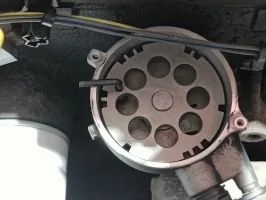
The new one came late tonight. Decided to put it at TDC and align the holes in the OPDA and get it ready to pull out tomorrow afternoon. Old OPDA is lined up with an allen key in the hole.
1737686587666.png

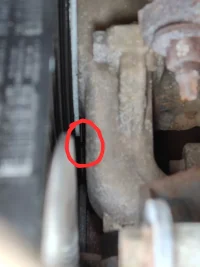
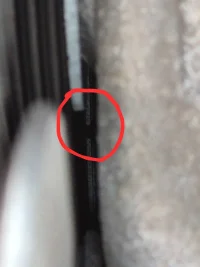
However, I am pretty sure I am not at TDC. Doing some manaual focusing on my cell camera I was able to get two OK pictures. I painted the alignment notch orange. But, no orange is in sight. I reached up from below and I think the notch is just out of sight from the top view. It feels like it is about 3/4 in. from lining up. I circled what I believe is the alignment indicator from the top view, and there is no orange in sight. It is really hard to see that indicator from the top, but I think that is it.
1737686895766.png1737686942494.png

Do I pull the OPDA where it is or turn the engine some more even though I am pretty sure the holes in the OPDA will not line up? I am thinking line up the alignment notch and just pull the OPDA without worrying about the holes lining up. But, I am knew at this so that may not be correct.


Also, any thoughts on the sensor to use. The new Crown one that is in it, or the NAPA one I bought a few weeks ago.
 
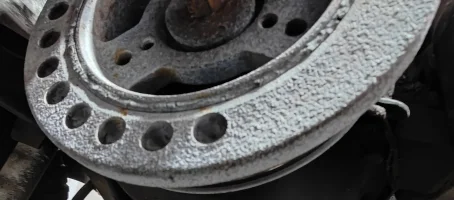
If your crank pulley is coming apart, the outer ring with the timing notch can slip. This would cause it to be incorrect. Inspect the crank pulley for cracked rubber and any wobble, looseness.

I can't really see if it's the pointer in the pics.

This is your timing pointer.
timing cover.PNG
 
  • Like
Reactions: lBasket
I will take the belt off tomorrow afternoon and see if the crank pully is loose. Probably see the indicator better without the belt on also. Assuming it has moved then I should just go with the OPDA holes lining up as TDC, correct? If it hasn't moved what else would cause this? It runs fine except for the limp mode and code every few weeks that just started a few months ago. No vibrations or anything.
 
  • Like
Reactions: lBasket
Personally if you've never changed the crank pulley I'd just do it preemptively.

-Mac

Not a bad idea, but right now I just want to get it running again hopefully without throwing the code and going into limp mode. Previous owner put an over sized radiator in it. So, I am not sure I could pull the crank pulley without removing the radiator. Which, is something I don't want to do right now.
 
  • Like
Reactions: macleanflood
Yes, you could just line up the OPDA holes.

And then start looking into replacing the crank pulley if it's going bad. They will eventually start rubbing the timing cover and possibly wearing the belt.

I had to pull the radiator to replace my crank pulley because of the length of the puller.
 
Yes, you could just line up the OPDA holes.

And then start looking into replacing the crank pulley if it's going bad. They will eventually start rubbing the timing cover and possibly wearing the belt.

I had to pull the radiator to replace my crank pulley because of the length of the puller.


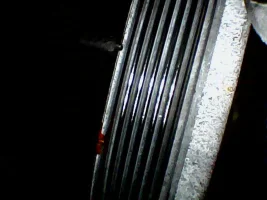
Took the belt off and tried to move the crank pully. It will not move at all in any direction. Seems pretty solid.
1737759202462.png

Found the alignment notch maybe a little passed 12:00 when the OPDA holes are lined up. You can't see it looking with your eyes because it is under the water pump / fan. I had to use my borescope to take the picture of it.
1737759274599.png

Wonder if it really did just move a little. Would the crank pully and OPDA not agreeing on TDC cause my P0344? Guess I will find out as I am just going to change the OPDA and leave the crank pully where it is.
 
The crank sensor is on the bellhousing, there're no sensors on the the crank pulley.

Yeah, the rubber in yours looks pretty bad, it's probably slipped.
 
The crank sensor is on the bellhousing, there're no sensors on the the crank pulley.

Yeah, the rubber in yours looks pretty bad, it's probably slipped.

Compared to new one online it doesn't look that good. I will keep an eye on it. Might paint a mark across it and see if it every moves again.

So, got the Crown OPDA back in and reconnected the battery. I also just used the Crown sensor. I still have the NAPA one and the old one that I assume is the Dorman one that came with the Dorman OPDA. Went for a short drive and got a P0116. It didn't go into limp mode though. Never had that code before either. Sounds like I need to take it to a shop to get the CMP and CKP sync'ed. Is that what the relearn does?
 
Last edited:
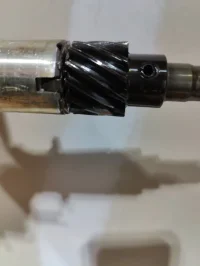
Play in old OPDA. The new Crown barely moves up and down at all.

Wear on old OPDA and camshaft.
1737767101326.png
1737767118743.png
 
That code means you didn't get the OPDA in sync with TDC within the tolerance the PCM will accept.

The scan tool will display how many degrees your are out so that you can adjust it to as close to zero as possible.

Or you can just slightly move the OPDA on way or the other till it goes away.

The 06 will relearn the difference by disconnecting the battery.
 
Also, how did the vertical movement compare on the new one?

See the video above of the old one. The new one didn't really move at all.

New problem. I loosened the OPDA and move it a little. But, now it want start at all. No check engine light either. It trys to start, but it won't stay running more than half a second. Going to try and move it some more, but I wasn't expecting it to not run after moved it.
 
Go the other way.

That is what I just did before I came back in and read this. :LOL:

It runs now. Still got a P0116, but I think I am done. I am hungry and cold. I will find someone with a scan tool, so it can be set perfect. There is a local shop that works on Jeeps that I am going to see if they are open tomorrow. I would think he would have one and be cheaper than a dealership. If I can't find anyone near by with scan tool that can look at it soon'ish, what is the cheapest scanner than read how many degrees I am out of sync.

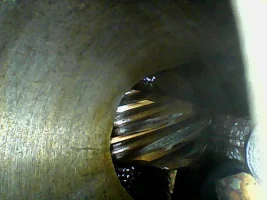
Any thoughts on the condition of the gears?
 
From what I can tell, they don't look bad.

The cam gear is always hard to see.

I didn't think it looked to bad. But, I have only seen some pictures on here and some looked way wores. I used my borescope to take the camshaft picture. But, even then it is hard to see much.

Doing some more reading about the P0016 code, and I see you can trigger a relearn by removing the negative battery cable and connecting it to the positive. Would the P0016 code show up even if I managed to guess and get the OPDA turned to be in range? Or, would I have to do a relearn after every try? I also have a cheap bluetooth scan device that I use Torque with. I can add custom PIDs, but I have no clue fo the values I would need to read the sync difference.
 
I don't know of any of the cheaper ones that can do it. There's a thread somewhere on the ones that can.

I didn't do a reset until after I got rid of the code. Once it was adjusted out to the point it didn't throw a code, I did the reset which stores the cam/crank difference in memory
 
Novak Conversions Jeep Wrangler TJ engine mounts